
What Is KING777 App?

KING777 App is the Android application for KING777 Game. It brings different online game categories, account management, wallet functions, bonuses and rewards together in one mobile interface.
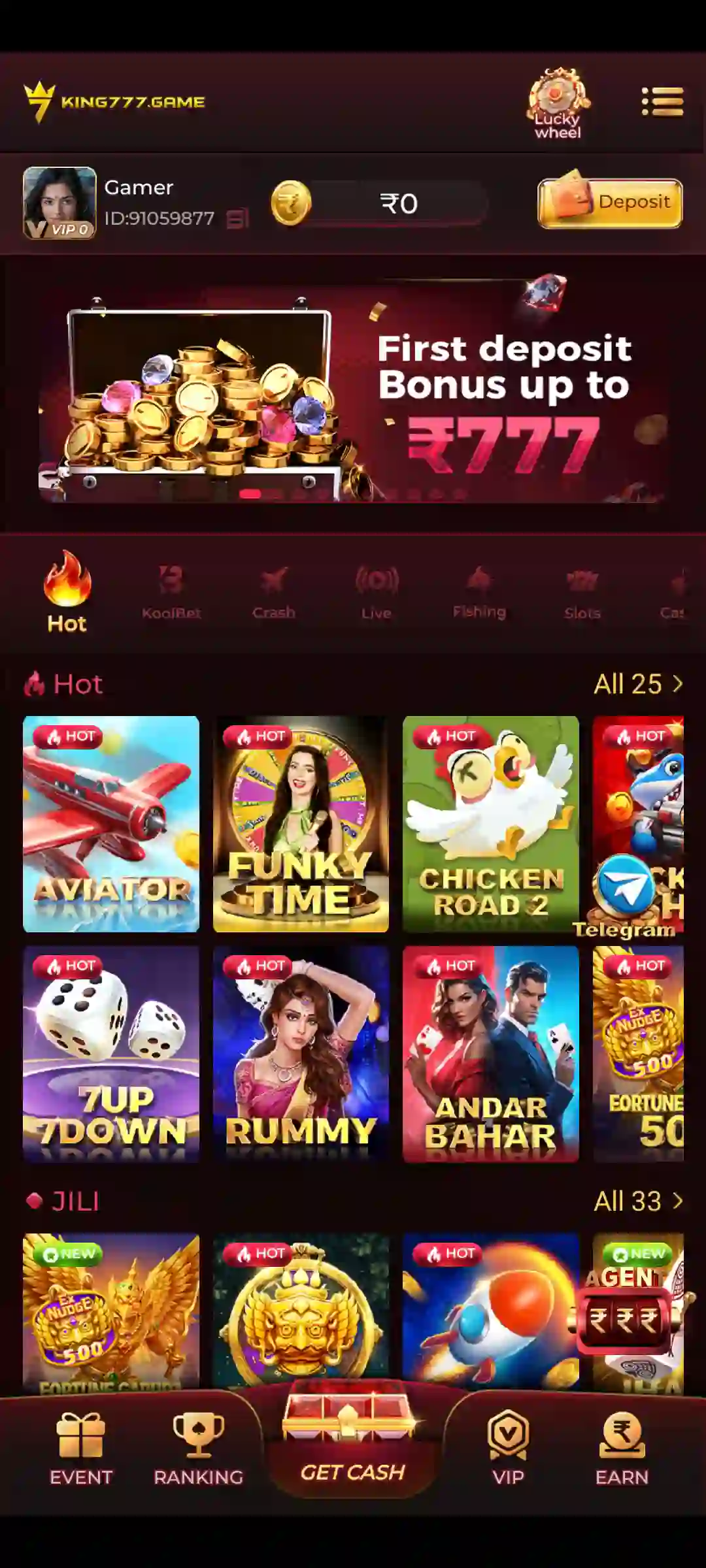
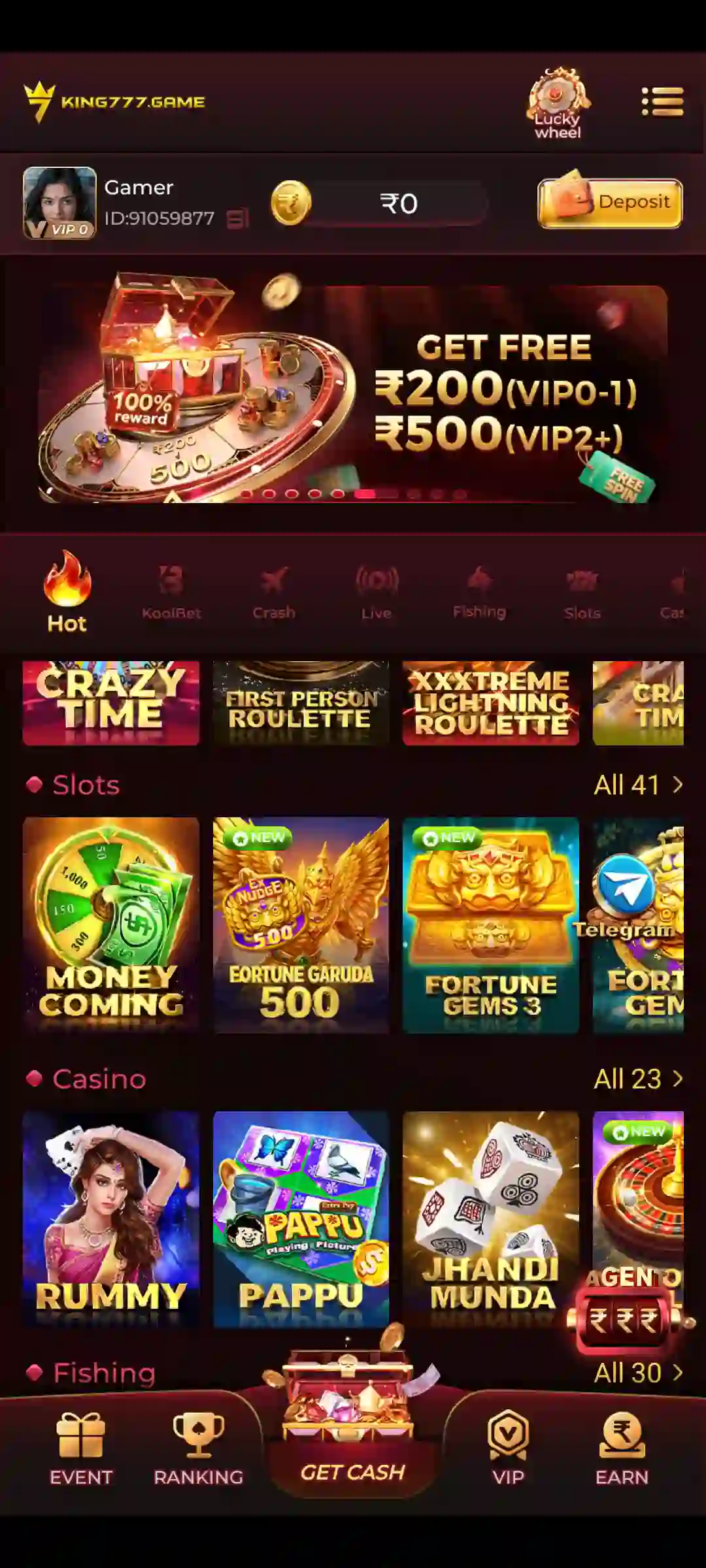
The home screen displays the account balance, game lobby, promotional banners and shortcuts for Menu, Ranking, Get Cash, VIP and Earn. Users can browse available games, open account settings, review balance information and access promotional sections without installing separate applications for individual titles.
The My Profile section includes Notifications, Balance Records, Account & Security, Live Support, Gifts, Settings, Ticket and Logout.
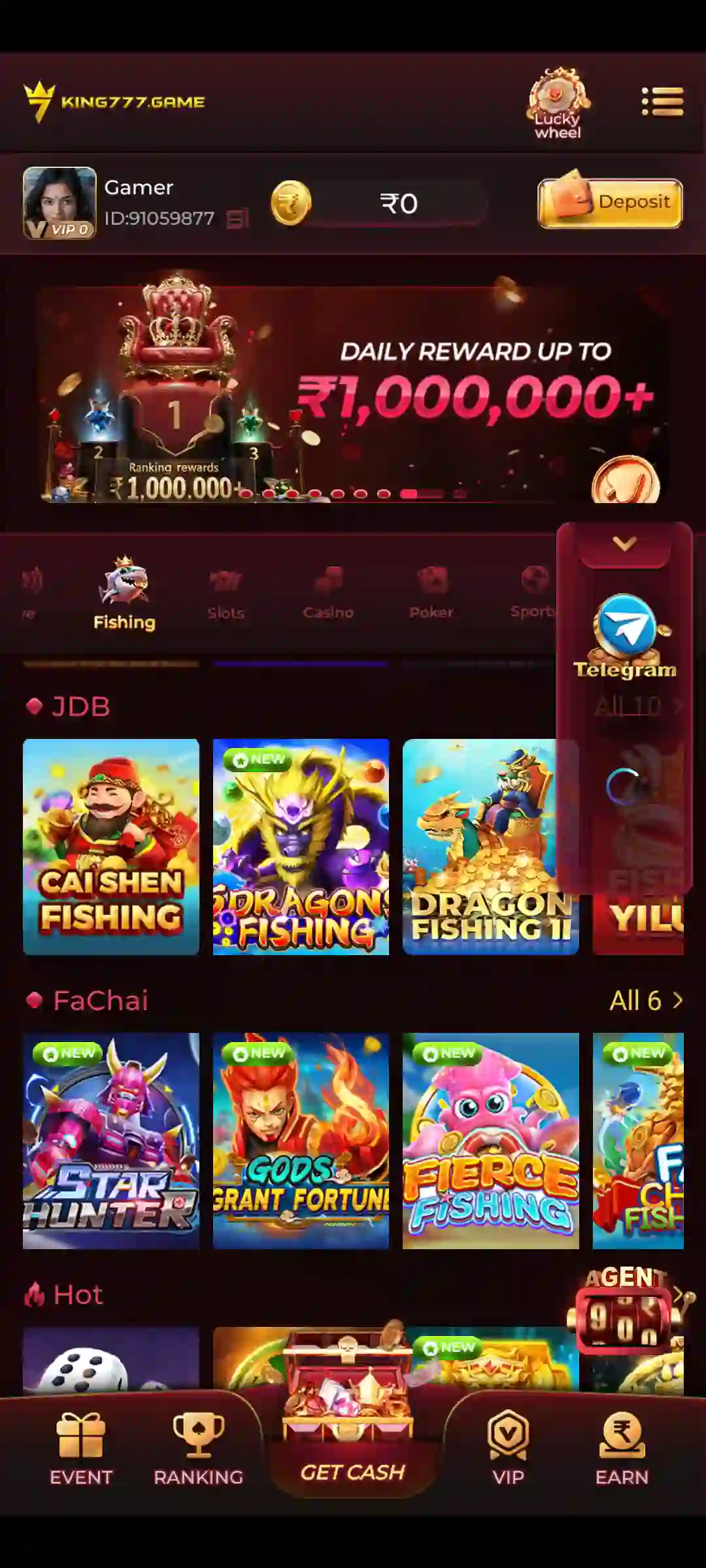
KING777 also includes a side menu with categories such as Crash, JILI, Fishing, Evolution, KoolBet, iNOUT, Casino, Slots, Poker, Sports and ICG.
For everyday use, start from the home screen:
- Open Menu to browse game categories.
- Select Ranking to view available ranking information.
- Open Get Cash for the corresponding in-app feature.
- Select VIP to review VIP-related information.
- Open Earn for reward-related features.
- Use My Profile for account security, records and support.
- Open the balance area to find Wallet options.
The available games, promotional offers and application features may change following updates.
KING777 App Details for Android
KING777 App is designed for Android mobile devices and provides access to different gaming and account-related features through one application.
It is useful to distinguish between the following:
- KING777 App: The installed Android application used to access the game lobby and account tools.
- KING777 APK: The Android installation package used to install the application.
- KING777 Game: The multi-game platform available through the app.
- KING777 Account: The account connected to the registered mobile number.
- KING777 Login: The account-access process using mobile verification or saved login credentials.
- KING777 Wallet: The section containing Deposit, Withdraw and related balance functions.
The current application version, APK file size and Android requirements are displayed separately in the game’s technical information.
An APK download and an installed application are not the same thing. After downloading the file, Android must complete installation before the application can be opened.
For first-time access, users also need to verify their registered mobile number.
KING777 App Key Features
KING777 combines game discovery, account management, promotional offers and wallet-related functions.
Home Screen and Game Lobby
The home screen displays the available game collection, account balance and promotional information.
Users can browse featured titles or open the relevant category through Menu.
Menu and Game Categories
Menu provides access to different sections, including Crash, JILI, Fishing, Casino, Slots and other supported collections.
Each category contains games with different controls, gameplay rules and results.
Bottom Navigation
The bottom navigation includes the following shortcuts:
- Menu: Browse available game categories.
- Ranking: View ranking information and available leaderboard events.
- Get Cash: Open the corresponding account feature.
- VIP: Access available VIP information and benefits.
- Earn: Explore qualifying reward-related activities.
The content shown inside these sections depends on the current application and account.
My Profile
My Profile is the main area for account-related settings and records.
It includes:
- Notifications
- Balance Records
- Account & Security
- Live Support
- Gifts
- Settings
- Ticket
- Logout
These options help users locate account-security settings, review recorded activity and request assistance.
Wallet
Wallet contains separate Deposit and Withdraw options.
Users can also review the relevant balance information and transaction records.
Bonuses and Rewards
The application includes promotional features such as First Deposit Bonus, 7 Days Daily Bonus, Ranking Rewards and Referral Rewards.
Eligibility, wagering requirements and reward availability depend on the selected offer.
Customer Support
Live Support and Ticket provide ways to report account, application and transaction-related problems.
Never disclose an OTP or login password when requesting assistance.
How to Navigate KING777 App
Understanding KING777’s navigation helps users locate games and account features more easily.
KING777 Home Screen
After opening the app and completing any required verification, users arrive at the main interface.
The home screen provides access to the game lobby, account balance, promotions and navigation shortcuts.
The available layout includes Menu, Ranking, Get Cash, VIP and Earn.
KING777 Bottom Navigation
Menu is used to browse different game collections.
Ranking provides access to leaderboards or related promotional information.
Get Cash opens the feature identified by that label in the application.
VIP provides access to VIP-related information.
Earn displays qualifying reward opportunities or related account activities.
KING777 Side Menu
The side menu contains the following categories and shortcuts:
- Home
- Crash
- JILI
- Fishing
- Evolution
- KoolBet
- iNOUT
- Casino
- Slots
- Poker
- Sports
- ICG
- Promotions
- Deposit
Users can select the relevant category to view its available game titles.
How to Find Account Settings
- Open KING777 App.
- Complete mobile verification or login if required.
- Open My Profile.
- Select Account & Security for password settings.
- Select Balance Records to review recorded account activity.
- Open Notifications for available notices.
- Choose Settings for application preferences.
- Use Live Support or Ticket when assistance is required.
How to Find Wallet Options
The account balance area provides access to Deposit and Withdraw.
Open the balance section and select the appropriate wallet function.
Always check whether you are using the Deposit or Withdraw tab before entering payment or bank details.
How to Find a Game
- Open KING777 App.
- Select Menu.
- Choose a game category.
- Review the available titles.
- Open the desired game.
- Read its instructions before participating.
Different games have different rules, controls and outcome mechanisms.
Games Available in KING777 App
KING777 includes multiple gaming categories within its Android application.
Crash and Quick-Round Games
Aviator: A crash-style game featuring a rising multiplier. Players decide when to cash out before the round crashes.
Aviator Pro: Another Aviator-related title available within the broader collection.
Mines: A grid-based game involving hidden safe tiles and mines.
Plinko: A ball-drop game in which a ball travels through pegs toward a result slot.
Go Rush: A quick-round title included in the available game collection.
Chicken Road 2: Another quick-game format.
7Up 7Down: A game using numerical outcome conditions under its selected rules.
Previous game results cannot guarantee future outcomes.
JILI Games
KING777 includes JILI titles such as:
- Super Ace
- Fortune Gems
- Golden Bank
- Crazy Hunter
- Lucky Coming
- Coin Tree
Different JILI games may have different symbols, bonus mechanisms, gameplay controls and result calculations.
KING777 Slot Games
The Slots category contains reel-based games with varying symbols and paytables.
Common features may include:
- Wild symbols
- Scatter symbols
- Free spins
- Multipliers
- Bonus rounds
- Different reel layouts
Each title has its own rules and payout conditions.
Rummy and Teen Patti
Rummy focuses on arranging cards into valid sets and sequences.
Important Rummy concepts include pure sequences, impure sequences, sets, jokers, drawing and discarding.
Teen Patti generally involves comparing three-card combinations.
Common categories include Trail, Pure Sequence, Sequence, Color, Pair and High Card.
The available variation determines the exact rules.
Other Card Games
KING777 also includes card-game formats such as:
- Dragon Tiger
- Callbreak
- Ultimate Texas Hold’em
- Poker
- Andar Bahar
Each format uses different rules and scoring or comparison methods.
Fishing Games
Fishing Games offer arcade-style gameplay involving moving targets and shooting controls.
Examples include:
- Happy Fishing
- Jackpot Fishing
- Cai Shen Fishing
- Royal Fishing
- Mega Fishing
Target values, controls and scoring systems vary between titles.
Casino and Live Games
KING777 includes Casino and Live gaming categories with titles such as:
- Crazy Time
- European Roulette
- Monopoly Live
- Jhandi Munda
The platform also includes other available Roulette and interactive game formats.
Other Game Collections
Additional game categories include Evolution, KoolBet, iNOUT, Sports and ICG.
The games shown in these sections depend on the currently available catalogue.
KING777 App Login and My Profile
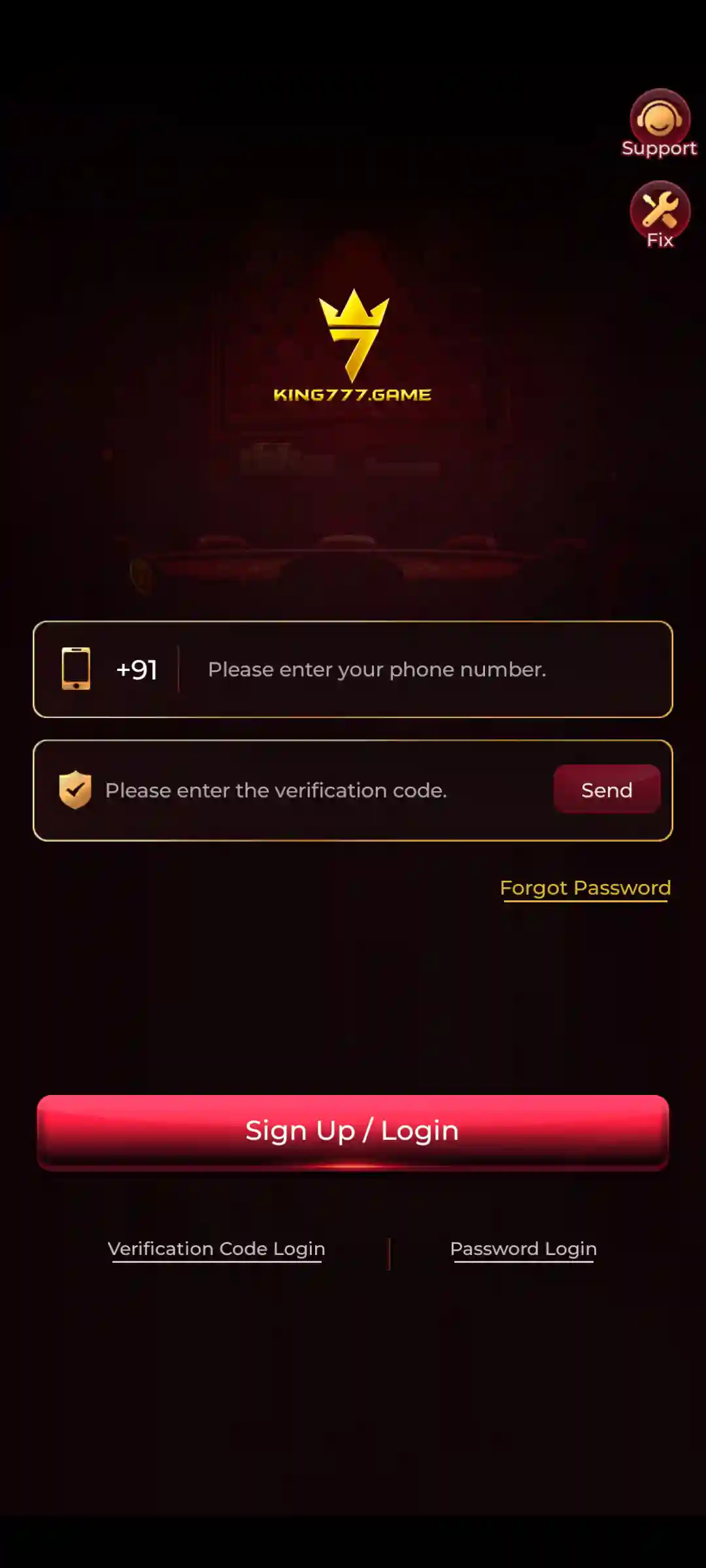
KING777 uses a registered mobile number and SMS verification for first-time account access.
After completing verification, users can configure login credentials through My Profile.
First-Time Mobile Verification
- Open the installed KING777 App.
- Enter the mobile number used during download.
- Tap Send Code.
- Wait for the verification SMS.
- Enter the received verification code.
- Complete mobile-number binding.
- Continue to the KING777 game lobby.
The registered mobile number should remain active and accessible.
How to Set KING777 Login Password
Open:
My Profile → Account & Security → Login Password
Then complete the following steps:
- Enter the registered mobile number if requested.
- Request the verification code.
- Enter the received code.
- Create a password containing 8–32 characters.
- Enter the password again under Confirm Password.
- Save the password.
A unique password helps protect the account.
KING777 Login for Returning Users
After registration and password setup, returning users can access their accounts using their registered mobile number and login password.
Additional verification may be required.
If login fails, check the mobile number and password before trying again.
Notifications and Balance Records
Notifications provide access to available application and account messages.
Balance Records help users review recorded account activity.
These records can be useful when checking the status of a transaction.
Live Support and Ticket
Live Support provides access to available customer assistance.
The Ticket feature allows users to report problems through the application.
When reporting an issue, include the relevant screen, error message and transaction reference where applicable.
Never share OTPs or passwords.
KING777 App Wallet: Deposit and Withdrawal
KING777 Wallet provides separate Deposit and Withdraw functions.
Users should open the appropriate tab before entering payment or bank-account information.
How to Deposit in KING777 App
The Deposit section includes available payment options such as Paytm, PhonePe and QR Code, as displayed in the application.
To review and complete a deposit:
- Open KING777 App.
- Open Wallet or the Deposit shortcut.
- Select the Deposit tab.
- Review the available payment methods.
- Choose the intended payment option.
- Select or enter the amount.
- Check the displayed payment instructions.
- Verify the recipient and payment destination.
- Complete the transaction only after confirming the information.
- Return to Wallet and review Balance Records.
The available payment methods and instructions should be checked during the actual transaction.
KING777 Deposit Not Showing in Wallet
If a deposit does not appear immediately:
- Open Balance Records.
- Check whether the transaction is recorded.
- Review the payment status.
- Keep the transaction reference.
- Avoid immediately repeating the same payment.
- Contact Live Support if the transaction remains unresolved.
Checking the recorded transaction before paying again helps avoid duplicate payment attempts.
How to Open KING777 Withdrawal
Open Wallet → Withdraw.
The withdrawal area displays account-related information needed to review or submit a request.
Before continuing, check the available withdrawable amount and the selected bank information.
How to Add Bank Details
If the bank account is not linked, use the available + Bank or Add Card option.
The form requests:
- Account Holder Name: Enter the name associated with the bank account.
- Bank Account Number: Enter the correct account number.
- IFSC Code: Enter the bank’s 11-character IFSC code.
Check every field carefully before saving.
Incorrect bank information can cause payment problems or failed withdrawal requests.
Cash Balance and Withdrawable Balance
KING777 displays Cash Balance and Withdrawable Balance as separate account values.
Cash Balance represents the balance displayed in the account.
Withdrawable Balance represents the amount currently eligible for withdrawal under the applicable conditions.
These amounts may differ because of promotional requirements, wagering conditions or account restrictions.
Before Requesting Withdrawal
Review:
- Available withdrawable balance
- Bank-account details
- Withdrawal amount
- Daily withdrawal limits
- Applicable fees
- Wagering requirements
- Account verification status
- Any displayed transaction conditions
Do not assume that every amount shown under Cash Balance is immediately withdrawable.
Withdrawal Problems
If a withdrawal is delayed or rejected:
- Check the transaction status.
- Review the saved bank details.
- Confirm the requested amount is within available limits.
- Review outstanding account conditions.
- Check Balance Records.
- Use Live Support if the issue remains unresolved.
Keep the transaction reference and never disclose login credentials during support requests.
KING777 App Bonuses and Rewards
KING777 provides different promotional sections for eligible users.
Available promotions include First Deposit Bonus, 7 Days Daily Bonus, Ranking Rewards and Referral Rewards.
The actual value and eligibility of each offer depend on the selected promotion.
KING777 First Deposit Bonus
The First Deposit Bonus is associated with an eligible first deposit.
Before participating, review:
- Whether the account qualifies
- Minimum deposit requirements
- Promotional validity
- Wagering requirements
- Bonus withdrawal conditions
- Any applicable exclusions
A bonus credited to an account is not necessarily immediately withdrawable.
KING777 7 Days Daily Bonus
The 7 Days Daily Bonus is a promotional feature arranged across a seven-day period.
Users should open the relevant promotional section to review the rewards and eligibility for each day.
Qualifying activity and claim conditions may apply.
Ranking Rewards
Ranking-related promotions are available through the Ranking section.
Users can review the displayed leaderboard information and relevant campaign conditions.
Ranking positions or rewards may change during an active event.
KING777 Referral Rewards
Referral promotions allow eligible users to invite others through an available referral code or link.
Qualification may depend on:
- An active referral campaign
- New-user eligibility
- Account verification
- Required activity
- Applicable reward conditions
Sending an invitation alone does not guarantee a reward.
VIP Benefits
The VIP section contains information about account levels and available VIP-related benefits.
Eligibility depends on the account and the current programme conditions.
Gifts, Earn and Events
KING777 also provides Gifts, Earn and Events-related features.
These sections may contain available promotional rewards or campaign activities.
Users should check the active terms before expecting a particular benefit.
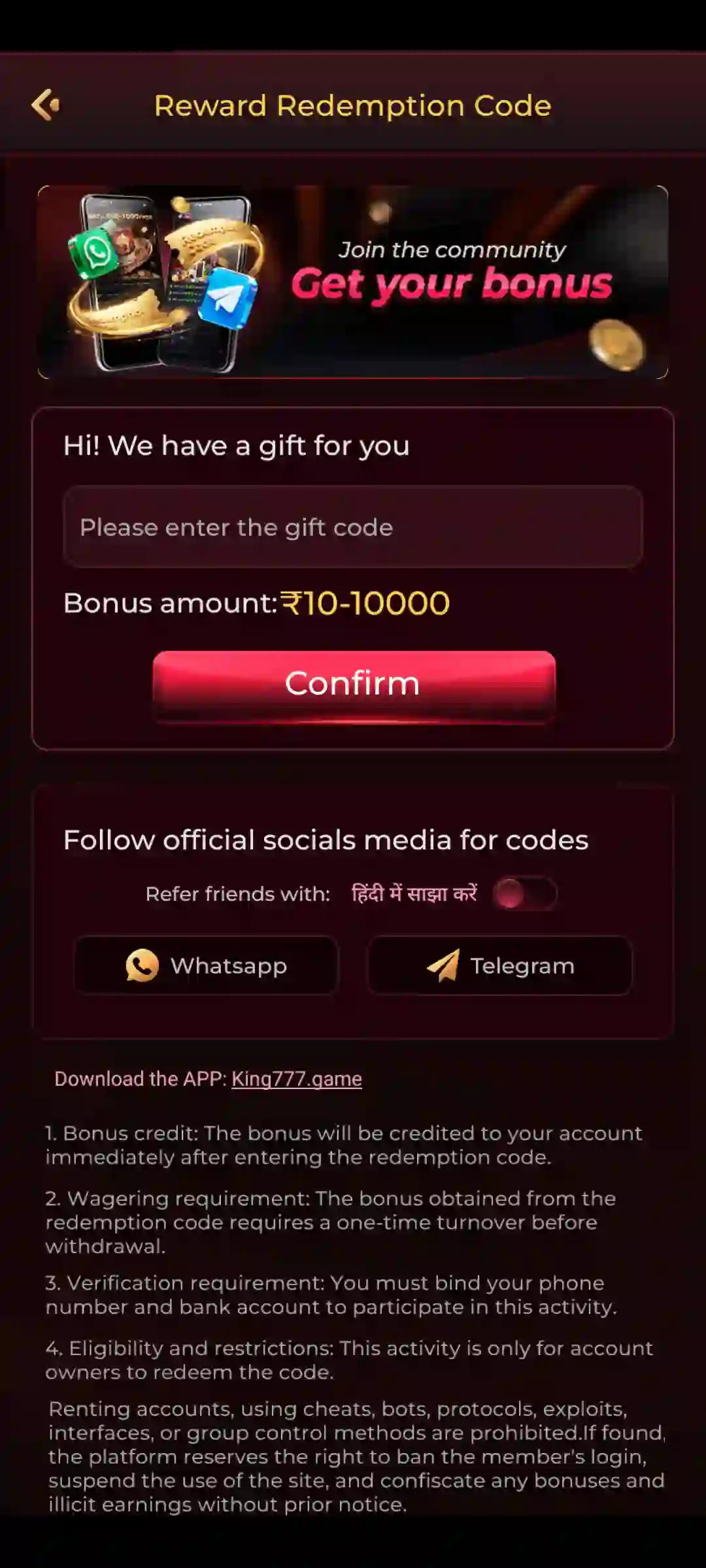
KING777 Promo Codes
Promotional codes may be available during selected campaigns.
Before using a code, check its validity, expiry conditions, usage limitations and eligibility requirements.
Codes published on unrelated websites may be outdated or invalid.
No bonus, promotional code or referral programme guarantees financial profit.
How to Download, Install and Open KING777 App
The first-time process involves downloading the Android APK, installing it and verifying the registered mobile number.
KING777 App Download and Setup
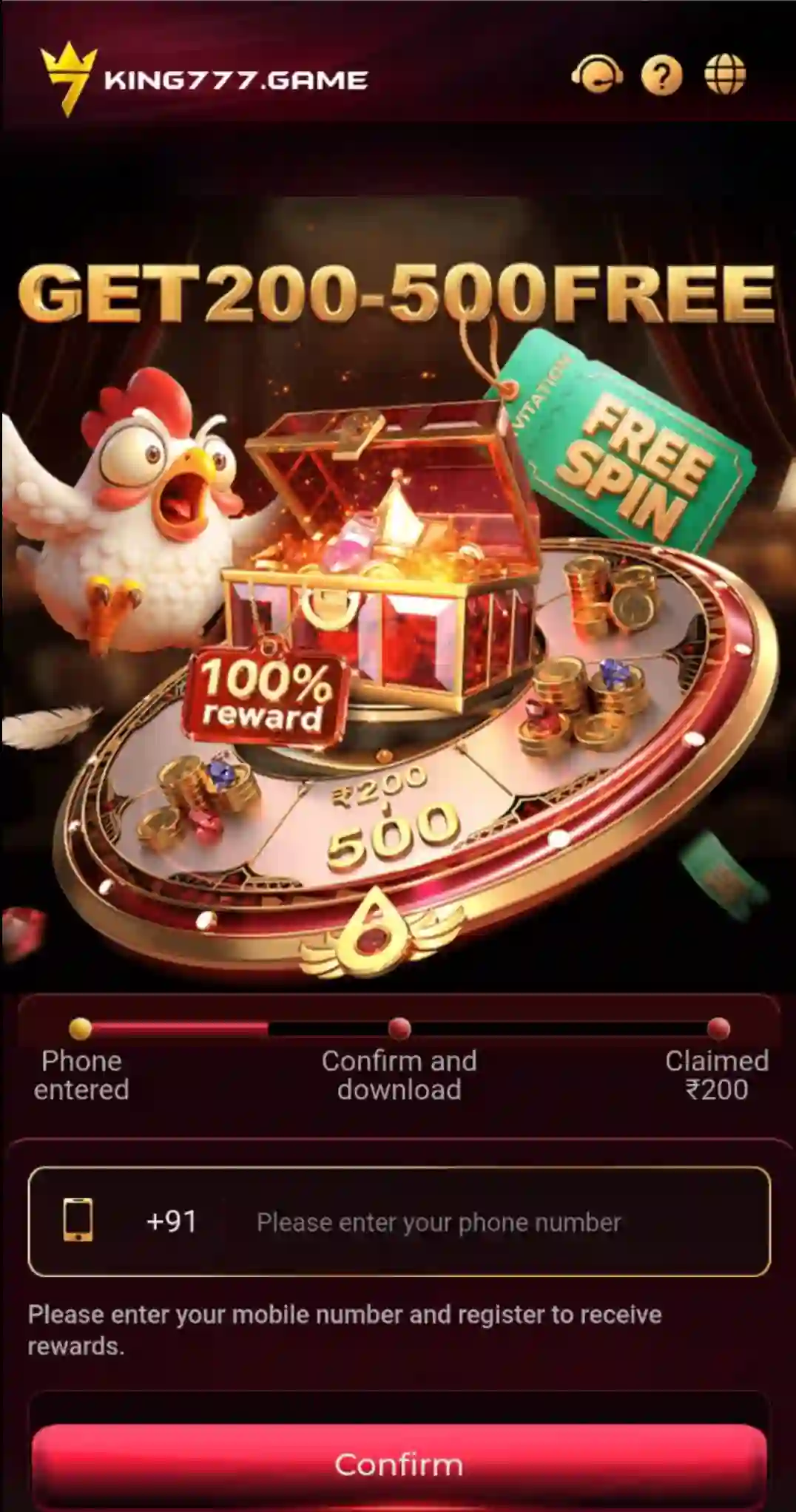
- Tap KING777 Game Download.
- Enter the active mobile number.
- Check the number and tap Confirm.
- Wait for the APK to download completely.
- Open the downloaded file from Android Downloads or File Manager.
- Review the APK source and Android installation prompt.
- Tap Install only if the file is trusted and Android has not identified it as harmful.
- Wait for installation to finish.
- Open KING777 App.
- Enter the same registered mobile number.
- Tap Send Code.
- Enter the SMS verification code.
- Complete mobile-number binding.
- Access the application.
What to Do After First Login
After signing in:
- Open Menu to browse games.
- Select My Profile for account settings.
- Open Account & Security to set a login password.
- Use Wallet for Deposit or Withdraw.
- Open Balance Records for recorded account activity.
- Explore Ranking, VIP and Earn for available promotional features.
If KING777 Is Already Installed
Users with an existing installation normally do not need to download the APK again simply to sign in.
Open the installed application and use the available login process.
If an installation-specific problem occurs, investigate the Android error before replacing an existing app.
KING777 App Latest Version and Updates
KING777 application updates may introduce changes to available games, navigation, performance and account-related functions.
Before updating, check the installed application and the intended new release.
How to Check the Installed Version
- Open Android Settings.
- Select Apps.
- Find KING777.
- Open its App Information screen.
- Review the installed version information.
- Compare it with the intended update.
Android menu labels can vary between phone models.
How to Update KING777 App
- Review the currently installed version.
- Obtain the intended update package from a trusted source.
- Confirm that the download is complete.
- Check that sufficient device storage is available.
- Open the APK through Android’s installer.
- Review the update prompt.
- Continue only if Android accepts the package and no harmful-app warning appears.
- Open KING777 after the update.
- Confirm that the account and game lobby load normally.
Can KING777 App Be Updated Without Uninstalling?
Android can normally update an installed application when the replacement APK has the same package identity and a compatible signing certificate.
If Android reports a package conflict, verify the update source before making changes.
Do not immediately uninstall the existing application because locally stored settings or data may be lost.
Improve KING777 App Performance on Android
If KING777 becomes slow or unresponsive, first identify the affected screen.
An issue affecting one particular game can have a different cause from a problem affecting the entire application.
Check Internet Connectivity
Online game screens and account tools depend on a working internet connection.
If KING777 loads slowly, check whether other applications or websites connect normally.
Test Wi-Fi or mobile data to identify a connection problem.
Check Available Storage
Android applications need available storage for temporary files, cached content and updates.
If storage is almost full, application performance may be affected.
Remove unnecessary files where appropriate, but avoid deleting account-related application data without understanding the consequences.
Reduce Background Activity
Several memory-intensive applications running simultaneously may affect performance on devices with limited memory.
Close unnecessary background applications before reopening KING777.
Restart the App
If KING777 freezes:
- Close the application.
- Wait until it has fully closed.
- Reopen KING777.
- Return to the affected screen.
- Check whether the problem continues.
Review Balance Records Before Repeating Payments
If Wallet is slow or a transaction appears delayed, review Balance Records before submitting another payment.
This helps avoid duplicate transaction attempts.
KING777 App Not Working? Common Fixes
Application problems can involve the game lobby, loading screen, internet connection, account verification, wallet or updates.
Identify the exact issue before taking corrective action.
KING777 App Shows a Black or Blank Screen
If KING777 opens to a blank screen:
- Check whether the problem affects the home screen or one particular game.
- Confirm that internet connectivity is working.
- Close and reopen KING777.
- Restart the phone.
- Check available device storage.
- Review whether the installed application needs an update.
Avoid clearing app data until you have confirmed that account access can be recovered.
KING777 App Freezes or Closes Unexpectedly
If the application freezes or crashes:
- Close other demanding applications.
- Restart KING777.
- Try opening the same screen again.
- Restart the device if necessary.
- Review any Android error message.
- Check whether the issue began after an update.
On supported Android devices, the option to clear temporary application cache may be available under:
Android Settings → Apps → KING777 → Storage → Clear Cache
Clear Cache is different from Clear Storage or Clear Data.
Clearing application storage may remove local settings and require the user to sign in again.
KING777 App Stuck on Loading
If KING777 remains on a loading screen:
- Check whether other websites work.
- Test the connection.
- Reopen the application.
- Try a different available game category.
- Note whether only one title is affected.
- Record any displayed error message.
If only one game fails, include that game’s name when contacting Live Support.
KING777 Notifications Not Working
If notifications are not appearing:
- Open Android Settings.
- Select Apps.
- Find KING777.
- Open Notifications.
- Review notification permissions.
- Return to the relevant application feature.
Android menu wording can vary between devices.
KING777 App Slow After an Update
If performance becomes worse after updating:
- Restart the phone.
- Confirm that the update completed.
- Check available storage.
- Compare performance in the game lobby and individual games.
- Review any Android error message.
Do not repeatedly uninstall or reinstall the application without determining the cause.
KING777 App Not Opening
If KING777 does not open:
- Confirm installation completed.
- Restart the app.
- Check Android storage.
- Restart the device.
- Review any displayed error.
- Check whether the installed version is compatible.
An app-launch issue should be distinguished from an APK installation failure.
KING777 Game Lobby Not Loading
If the lobby fails to load, check internet connectivity and reopen the application.
If other sections work but one game fails, the problem may be limited to that title.
KING777 OTP Not Received
If SMS verification fails:
- Check the registered mobile number.
- Confirm the SIM can receive messages.
- Check mobile network reception.
- Wait for the active code request.
- Enter the received code exactly.
- Use Live Support if the problem remains unresolved.
Do not share verification codes.
KING777 Login Password Not Working
Confirm that the correct registered mobile number is entered.
If no password has been created, complete mobile verification and use Account & Security to configure one.
For unresolved access problems, use available account-recovery or support options.
KING777 Wallet Balance Not Updating
If the Wallet balance appears incorrect or delayed:
- Check the selected Wallet tab.
- Review Balance Records.
- Check the relevant transaction status.
- Avoid repeating a payment before reviewing the earlier transaction.
- Contact Live Support if necessary.
KING777 App Update Failed
If an update fails:
- Check whether the package downloaded completely.
- Review available storage.
- Read Android’s installation message.
- Check package compatibility.
- Identify any existing installation conflict.
A package conflict requires a different solution from a network or storage problem.
How to Report a KING777 App Problem
When contacting Live Support or creating a Ticket, include:
- The affected screen or game
- The exact error message
- The approximate time of the issue
- Whether it happens on Wi-Fi or mobile data
- Whether the problem began after an update
- A relevant transaction reference, if applicable
Never include an account password or OTP.
KING777 Account Security and Responsible Gaming
KING777 includes account, wallet and promotional features, so users should protect their personal information and credentials.
Protect Your Login Details
Keep the registered mobile number accessible and use a unique login password.
Never share passwords or verification codes with another person.
Use Logout on Shared Devices
If KING777 is accessed on a shared phone, open My Profile and use Logout when finished.
Avoid leaving the account accessible to other users.
Review Payment Information
Before submitting a payment or withdrawal request, confirm the amount, account details, destination and applicable conditions.
For a delayed transaction, check Balance Records before repeating the request.
Avoid Modified APKs and Predictor Claims
Unknown modified APKs can create risks such as malware, password theft, OTP theft and payment-information exposure.
Claims involving unlimited balances, guaranteed winnings, fixed outcomes or Aviator and Mines predictors should not be relied upon.
Previous results, predictors and strategies cannot guarantee future gaming outcomes.
Responsible Gaming
KING777 should be treated as entertainment rather than a guaranteed income source.
Real-money participation can result in financial losses.
Users should understand game rules, establish personal limits, avoid chasing losses and review promotional terms before participating.
Applicable age and local legal requirements should also be observed.
Android Application Security
For general information about harmful application detection and Android security warnings, read the official Google Play Protect guidance.
Keep Android security protections enabled and review application permissions.
KING777 App Frequently Asked Questions
What is KING777 App?
KING777 App is the Android application for KING777 Game, featuring different game categories, account settings, Wallet, mobile verification and promotional sections.
What is the difference between KING777 App and KING777 APK?
KING777 APK is the Android installation package. KING777 App is the installed application used to access games and account features.
How do I download KING777 App?
Open the KING777 Game Download option, enter an active mobile number, tap Confirm and complete the Android APK download process.
Where can I find Aviator, Mines and Plinko?
Open Menu and browse the Crash or available quick-game sections to locate the titles.
How do I navigate KING777 App?
Use Menu for games, My Profile for account settings, the balance area for Wallet functions and the bottom navigation for Ranking, Get Cash, VIP and Earn.
How do I register for KING777?
Enter the mobile number during download, install the application, open it, tap Send Code and complete SMS verification using the same number.
How do I log in to KING777 App?
First-time access uses mobile-number verification. Returning users can use the registered mobile number and configured login password, subject to additional verification.
How do I set my KING777 Login password?
Open My Profile → Account & Security → Login Password, verify the registered number and create and confirm a password containing 8–32 characters.
Where can I check KING777 Deposit options?
Open Wallet → Deposit to review available payment methods, including the options displayed for Paytm, PhonePe and QR Code.
How do I add bank details for KING777 Withdrawal?
Open Wallet → Withdraw and use + Bank or Add Card where available. Enter the account holder’s name, bank account number and 11-character IFSC.
Why is my Cash Balance different from Withdrawable Balance?
Withdrawable Balance may differ because of account conditions, wagering requirements, limits or promotional restrictions.
What bonuses are available in KING777?
KING777 includes First Deposit Bonus, 7 Days Daily Bonus, Ranking Rewards and Referral Rewards, subject to current offer conditions.
Can KING777 App be updated without uninstalling?
A compatible Android package can normally update an existing application when its identity and signing requirements match.
What should I do if KING777 App is not opening?
Check that installation completed, confirm internet connectivity and available storage, restart the application and review any Android error message.
Why is KING777 App showing a blank screen?
A blank screen may result from connectivity, application loading or a problem affecting a particular game. Check whether the entire application or one section is affected.
What if KING777 OTP is not received?
Check the registered mobile number and SMS reception, wait for the current verification attempt and use Live Support if the issue continues.
How can I contact KING777 Support?
Open My Profile and select Live Support or Ticket. Provide relevant error details without disclosing passwords or OTPs.